MQTT 是一個輕量的 Pub/Sub 協定,拿來做聊天有幾個優點:
- QoS(Quality of Service)內建:提供三個等級的送達保證,最高等級 QoS 2 確保訊息恰好送達一次,不需要自己實作重送機制
- Payload 完全客製化:IM 需要的語意——已讀、上線狀態、群組通知——全部定義在 payload 裡,彈性高
Facebook Messenger 早期也是用 MQTT 做即時訊息的傳輸層。
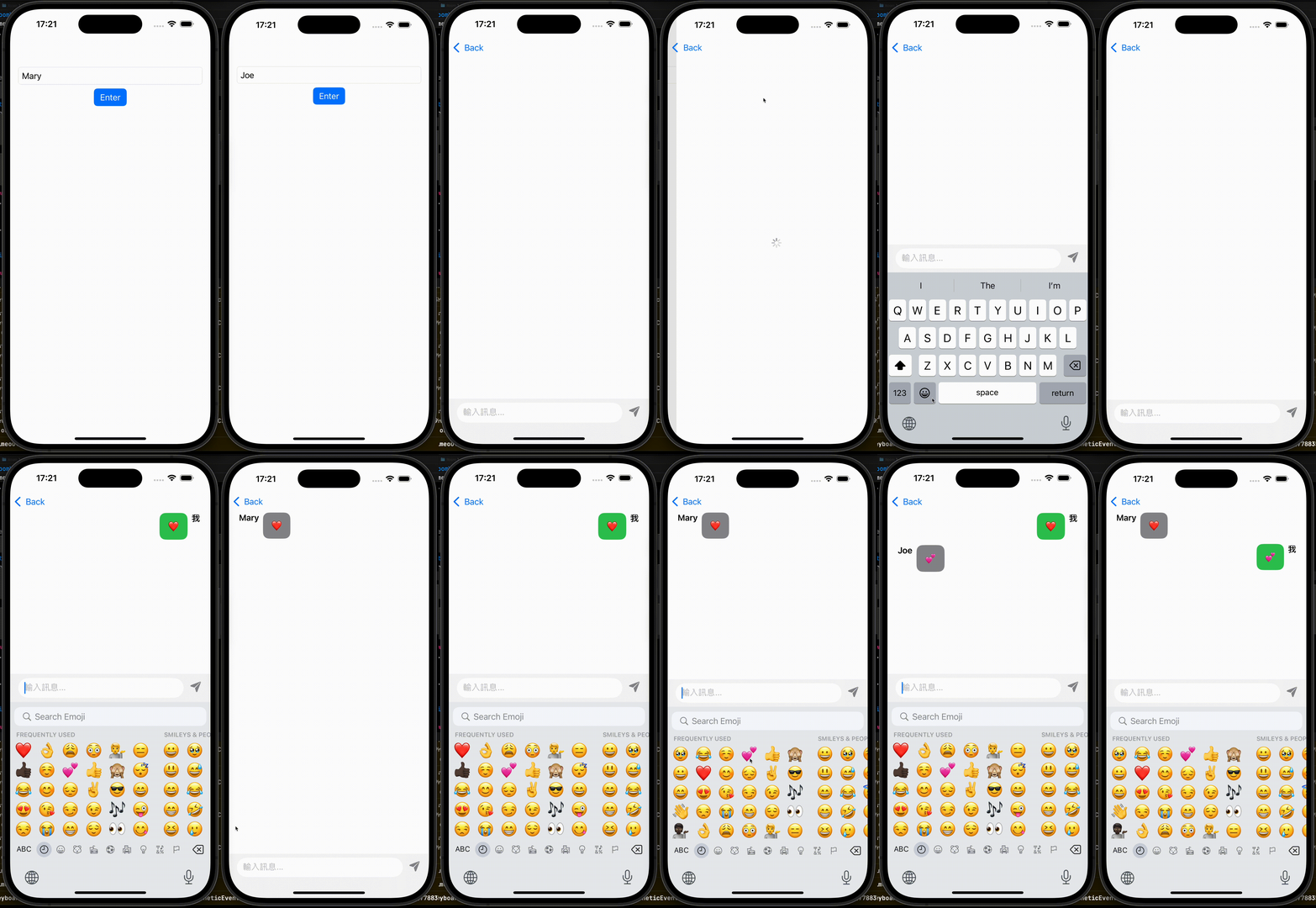
架構概覽
採用 MVVMC,兩個頁面:
- Home:輸入使用者名稱進入聊天室
- Room:聊天室主頁面,連線 MQTT broker、收發訊息
MQTT 的操作集中在 MQTTManager,ViewModel 不直接碰 MQTT。
MQTTManager
1
2
3
4
5
6
| actor MQTTManager {
static let shared = MQTTManager()
private let topic = "JoeChatDemo/chat"
private var client: MQTTClient?
private let eventLoopGroup = NIOTSEventLoopGroup()
}
|
用 actor 封裝,確保 client 的狀態在 concurrent 環境下安全存取。
連線
 1
 2
 3
 4
 5
 6
 7
 8
 9
10
11
12
13
14
15
16
17
18
19
20
21
22
23
24
25
| func connect(userId: String) async throws {
try? await disconnect()
self.client = MQTTClient(
host: "broker.emqx.io",
port: 1883,
identifier: userId,
eventLoopGroupProvider: .shared(eventLoopGroup)
)
client?.addPublishListener(named: topic) { result in
switch result {
case let .success(value):
if let data = String(buffer: value.payload).data(using: .utf8) {
NotificationCenter.default.post(name: .MQTTReceivedMessage, object: data)
}
case .failure:
break
}
}
try await client?.connect(cleanSession: true)
let subscribeInfo = MQTTSubscribeInfo(topicFilter: topic, qos: .exactlyOnce)
_ = try await client?.subscribe(to: [subscribeInfo])
}
|
使用公開的 broker broker.emqx.io,identifier 帶入 userId 區分不同使用者。
收到訊息後透過 NotificationCenter 發出去,讓 ViewModel 可以在 @MainActor 環境接收。
發送與斷線
 1
 2
 3
 4
 5
 6
 7
 8
 9
10
11
12
| func send(message: RoomViewModel.Message) async throws {
let data = try JSONEncoder().encode(message)
try await client?.publish(to: topic, payload: .init(data: data), qos: .exactlyOnce)
}
func disconnect() async throws {
client?.removePublishListener(named: topic)
try? await client?.unsubscribe(from: [topic])
try? await client?.disconnect()
try? await client?.shutdown()
self.client = nil
}
|
訊息資料結構
 1
 2
 3
 4
 5
 6
 7
 8
 9
10
11
12
13
14
15
16
17
18
19
20
21
22
| // 傳輸用(JSON 編解碼)
struct Message: Codable, Sendable {
let id: String
let userId: String
let userName: String
let content: String
}
// 顯示用(區分自己和他人)
struct DisplayMessage: Identifiable, Sendable {
let id: String
let name: String
let content: String
let fromMe: Bool
init(message: Message, myId: String) {
self.id = message.id
self.fromMe = message.userId == myId
self.name = fromMe ? "我" : message.userName
self.content = message.content
}
}
|
Message 是傳輸的 DTO,DisplayMessage 是 View 用的 Domain Model,在 init 裡把「是不是自己發的」算好,View 不需要做任何判斷。
RoomViewModel 接收訊息
 1
 2
 3
 4
 5
 6
 7
 8
 9
10
11
12
13
14
| private func setupCancellable() {
cancellable = NotificationCenter.default
.publisher(for: .MQTTReceivedMessage)
.receive(on: DispatchQueue.main)
.sink { [weak self] notify in
self?.handleReceiveMessage(notify: notify)
}
}
private func handleReceiveMessage(notify: Notification) {
guard let data = notify.object as? Data,
let message = try? JSONDecoder().decode(Message.self, from: data) else { return }
state.messages.append(DisplayMessage(message: message, myId: state.user.id))
}
|
MQTTManager(actor)收到訊息後,透過 NotificationCenter 把 Data 傳出來,RoomViewModel(@MainActor)在 main thread 解碼並更新 state。
使用的套件
- MQTTNIO — Swift Server 社群維護的 MQTT client
Demo
本文使用 Claude 共同完成